 Add name and date to a photo
Add your name and the date to a photo in a white band at the bottom, free and without uploading it.
Jump to the toolYour workspace Pixels · Preview · DownloadPrivate by default
Runs on this device. The first use downloads a 56 to 135 MB model once. Nothing is uploaded.
Type your name and the date the photo was taken. Both are printed in a white band across the bottom.
- Open a photoDrop, paste or choose one.
- Set the sizeType it, or pick a common size.
- DownloadSee the file size before you save.
Processed on your deviceNo watermark. No signup.
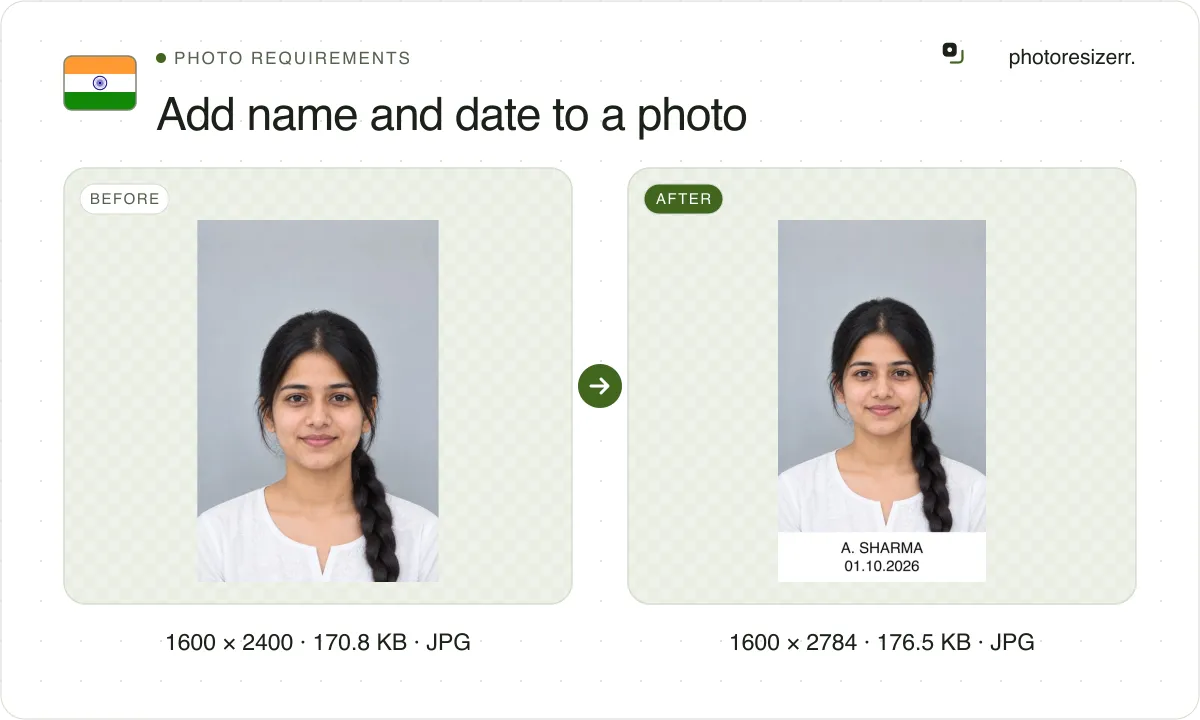
The band sits inside the form's box: at TNPSC's 130 x 170 pixels it takes 55 rows, as TNPSC specifies. SSC, NEET, JEE Main and UPSC's 2026 notices do not ask for it.
Which forms ask for a name and date on the photo?
Fewer than the tool pages say. We read the latest notice of each body that has asked for it, and these are the ones still asking, as of 30 September 2026.
| Form | Notice read | Name and date on the photo |
|---|---|---|
| TNPSC | Instructions to Applicants, 2025, and the Group II notice of August 2026 | Required, printed at the bottom, 55 of the 170 pixel rows |
| Kerala PSC | Notification 132/2026 | Required, printed legibly at the bottom |
| SSC | Selection Post Phase XIV notice, April 2026 | No. The form takes a live photo with your webcam |
| NEET (UG) | Information Bulletin 2026 | No. The 2025 bulletin asked for it |
| JEE (Main) | Information Bulletins 2025 and 2026 | No |
| UPSC CSE | Examination Notice 05/2026 | No. The 2025 notice asked for it |
Many guides still say SSC, NEET and JEE Main require it. Their 2026 notices do not. SSC goes further and rejects a photo of a photo: the form captures you live.
Other state commissions and universities may still ask. The notice you apply under decides, so read its photo paragraph. If it gives a box, type it in the size fields.
Where does the band go, and does it change the size?
It goes at the bottom, inside the box the form asks for. The tool takes the band's rows from that box and draws your photo into the rows above it.
So a 130 x 170 photo stays 130 x 170, and nothing of your face is covered. Some tools add the strip below the photo, which makes it taller than the form allows.
Others write the text over the photo, across your chin or collar. The band here is plain white with black text, centred, in a bold font sized to fit the widest line.
The file size is worked out with the text already in the picture, so the form's KB limit still holds once your name is on it.
How do you make a TNPSC photo with name and date?
TNPSC is the one body that draws the band to scale. Here is its photo paragraph, from the instructions every application follows.
TNPSC Instructions to Applicants
- Photo
- 4.5 cm high by 3.5 cm wide, 170 x 130 pixels
- Band
- Name and date of photography, 1.5 cm, 55 pixels, at the bottom
- Face
- 3.0 cm, 115 pixels, frontal, both ears and part of the neck
- File
- 20 to 50 KB, saved as Photograph.jpg
- Background
- White, taken in a photo studio
- Taken
- On or after the date of the notification
- Not accepted
- Phone photos, selfies, photocopies, family or tourist photos
- Document
- Instructions to Applicants, 2025, pages 13 and 14; the same text in Notification No. 07/2026, paragraph 3.3
- Source
- www.tnpsc.gov.in
- Read at the source on
Choose TNPSC 130 x 170 above, add your studio photo, and type your name and the date it was taken. The band is 55 pixels tall and your face fills the 115 above it.
The tool aims for 20 to 50 KB, and a plain photo can fall short at this box. Our studio portrait on a grey backdrop saved at 16,259 bytes even at full quality; a detailed photo reached 24,052.
The meter says when that happens. TNPSC's figures pull apart here: the same paragraph says a scanned print should be 200 DPI, which at 3.5 x 4.5 cm is about 276 x 354 pixels.
We could not see which of the two the upload screen checks, because it sits behind the login. Try the 130 x 170 file first, since that is the size TNPSC states in pixels.
TNPSC's signature is a 6.0 x 2.0 cm box, 230 x 75 pixels, signed in blue or black ink on white paper. The TNPSC page makes both files: TNPSC photo and signature size, with name and date.
Which date goes on the photo?
The date the photo was taken, not the date you apply. TNPSC wants it on or after the date of the notification. Kerala PSC wants a new profile's photo taken within 6 months.
Neither body prints a date format. The Today button writes the date as DD/MM/YYYY, the order Indian notices use; press it only if you took the photo today.
Type your name as your application spells it. Kerala PSC asks you to type the name and date again, exactly as printed, when you apply.
What happens to your photo?
Your selected photo is processed in your browser, without an image upload to a server. The page may download code and codecs needed for editing.
Save your result before closing the tab; unsaved edits are kept in memory rather than in an online account.
Common questions
Does SSC need a name and date on the photo?
Not in its 2026 notices. SSC's forms capture a live photo with your webcam and reject a photo of an existing photograph, so there is no photo file to print a band on.
Will adding the name change the photo's size?
No. The band takes its rows from the box you chose, so a 150 x 200 photo stays 150 x 200. The photo is scaled into the space above the band rather than covered by it.
Will the file stay under the form's KB limit?
Yes. The quality is chosen with the band already drawn, so a TNPSC photo lands at 50 KB or less and a Kerala PSC photo at 30 KB or less. A small box can miss a minimum; the meter says so.
Can I use a size that is not listed?
Yes. Choose Any size and type the form's width and height in pixels, then the KB limit under File size if the form sets one. The band follows the box you type.
Last updated: